
|
Changing Modes on Pro-E |
Post Reply 
|
| Author | |
Hybrid_v9 
Member 
Joined: 23 August 2004 Status: Offline Points: 208 |
 Post Options Post Options
 Thanks(0) Thanks(0)
 Quote Reply Quote Reply
 Topic: Changing Modes on Pro-E Topic: Changing Modes on Pro-EPosted: 09 June 2006 at 11:05am |
|
Hi, just got my Pro-E and I can't figure out how to change it to semi-auto, every time I think I have it, it goes into Turbo or something.
Please help my dumb ass, thanks. |
|
 |
|
 |
|
|
Hybrid_v9
Member
Joined: 23 August 2004 Status: Offline Points: 208 |
Post Options
Thanks(0)
Quote Reply
Posted: 09 June 2006 at 11:12am |
|
I just want to get to Semi-auto and STAY there.
|
|
|
|
|
|
|
|
Hybrid_v9
Member
Joined: 23 August 2004 Status: Offline Points: 208 |
Post Options
Thanks(0)
Quote Reply
Posted: 10 June 2006 at 10:48am |
|
*bump* |
|
|
|
|
|
|
|
cus98tom
Member
Joined: 12 July 2005 Status: Offline Points: 491 |
Post Options
Thanks(0)
Quote Reply
Posted: 11 June 2006 at 9:44pm |
|
Download the manual from this site it has all the answers.
|
|
|
|
|
Hybrid_v9
Member
Joined: 23 August 2004 Status: Offline Points: 208 |
Post Options
Thanks(0)
Quote Reply
Posted: 12 June 2006 at 7:20pm |
|
I did and frankly it confused me. Can someone clarify it a bit?
|
|
|
|
|
|
|
|
Hybrid_v9
Member
Joined: 23 August 2004 Status: Offline Points: 208 |
Post Options
Thanks(0)
Quote Reply
Posted: 13 June 2006 at 9:27pm |
|
Anyone? (I feel like a **edited** for pestering the community like this but...) |
|
|
|
|
|
|
|
Xscout
Member
Joined: 08 April 2004 Location: United States Status: Offline Points: 33 |
Post Options
Thanks(0)
Quote Reply
Posted: 16 June 2006 at 9:25am |
|
http://www.wickedairsportz.com/manuals.php The forums on the WAS site are helpful, and they have a couple diferent e-grip manuals. This is presupposing your board is a WAS.
|
|
 
|
|
|
|
|
tippya5extreme
Member

Strike 1 - Filterdodging/Language 7/17 Joined: 12 June 2006 Location: United States Status: Offline Points: 745 |
Post Options
Thanks(0)
Quote Reply
Posted: 16 June 2006 at 9:16pm |
|
get a screw driver that will fit the scre inside the grip. Setting/Off/Setting/Off and screw it to the setting you want
|
|

tippya5extreme |
|
|
|
|
Hybrid_v9
Member
Joined: 23 August 2004 Status: Offline Points: 208 |
Post Options
Thanks(0)
Quote Reply
Posted: 21 August 2006 at 3:39pm |
|
Thats not how my Pro-E is set up, theres just a button...
|
|
|
|
|
|
|
|
Bruce A. Frank
Platinum Member 

KRL Reincarnated? Joined: 27 March 2004 Location: United States Status: Offline Points: 3063 |
Post Options
Thanks(0)
Quote Reply
Posted: 21 August 2006 at 8:46pm |
|
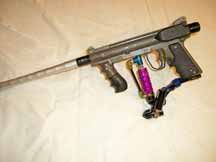
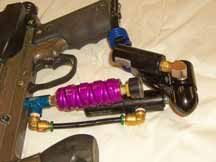
Are you sure you have an Electronic Trigger model? The only "button" that I am aware of is the safety. You are saying there are no screw driver access holes (two of them) on the front of the grip? |
|
|
|
|
|
|
iceman1186
Gold Member 

Joined: 09 October 2002 Location: United States Status: Offline Points: 1036 |
Post Options
Thanks(0)
Quote Reply
Posted: 21 August 2006 at 9:25pm |
|
Pics would help us solve this problem alot quicker.
|
|

|
|
|
|
|
Hybrid_v9
Member
Joined: 23 August 2004 Status: Offline Points: 208 |
Post Options
Thanks(0)
Quote Reply
Posted: 22 August 2006 at 12:37pm |
|
its a stock pro-e |
|
|
|
|
|
|
|
Hybrid_v9
Member
Joined: 23 August 2004 Status: Offline Points: 208 |
Post Options
Thanks(0)
Quote Reply
Posted: 22 August 2006 at 12:41pm |
|
yeah its a WAS board, i got it to work the other night, but i cant get it to shoot anymore
|
|
|
|
|
|
|
|
Hybrid_v9
Member
Joined: 23 August 2004 Status: Offline Points: 208 |
Post Options
Thanks(0)
Quote Reply
Posted: 22 August 2006 at 1:07pm |
|
This is what I'm doing Step 1) it says (To Turn on the Equalizer) "Press and hold the power button for 1/2 of a second until the LED lights orange, and release it. The LED should stay orange for a couple seconds then flash once, then blink orange to show normal operation." I do this, but instead of it flashing red, then blinking orange, as soon as I release the button, it stays solid red. What am I doing wrong? |
|
|
|
|
|
|
|
Bruce A. Frank
Platinum Member
KRL Reincarnated? Joined: 27 March 2004 Location: United States Status: Offline Points: 3063 |
Post Options
Thanks(0)
Quote Reply
Posted: 22 August 2006 at 2:00pm |
Okay, so the WAS board version is different than what is in the manual. Have you tried to shorten that button push? Don't hold it at all...just a quick push. Have you tried holding it down longer to see if it cycles through a sequence eventually displaying the orange LED? Have you tried multiple pushes? (My son's Angel, with a WAS board, mode is set with button push sequences) Have you tried calling WAS on the phone to ask them? Have you called Tippmann's Pro Shop to ask them? |
|
|
|
|
|
|
|
Hybrid_v9
Member
Joined: 23 August 2004 Status: Offline Points: 208 |
Post Options
Thanks(0)
Quote Reply
Posted: 22 August 2006 at 2:59pm |
|
Yeah I tried different button pushes, and no I haven't called em yet.
I went to my local proshop and the owner said a LOT of people have trouble figuring this thing out |
|
|
|
|
|
|
|
Post Reply
|
|
 Tweet
Tweet
|
| Forum Jump | Forum Permissions You cannot post new topics in this forum You cannot reply to topics in this forum You cannot delete your posts in this forum You cannot edit your posts in this forum You cannot create polls in this forum You cannot vote in polls in this forum |


 Topic Options
 Hybrid_v9 wrote: